
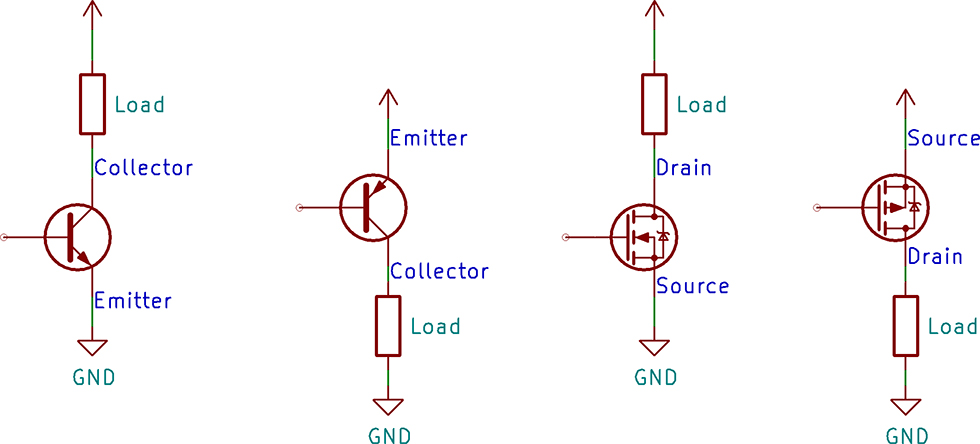
A common task for a transistor is switching a device on and off. There are two configurations for a transistor switch: low side and high side. The location of the transistor determines the type of circuit and its name. Either transistor configuration can use a BJT or MOSFET.
In this post, I draw the configuration for both transistor types, discuss which requires a driver, and explain why you would use either. If you are new to transistors, check out the resource links at the bottom. I have a few videos I made and some from element14’s The Learning Circuit, which do a great job introducing transistors.
Low-side transistor configuration
When the transistor is connected to ground, that means the load is between +V and the transistor. Since the transistor is switching the path to ground or is sitting on the low side of the load, it is called a low-side switch.
Typically these use an NPN BJT or an N-Channel MOSFET.
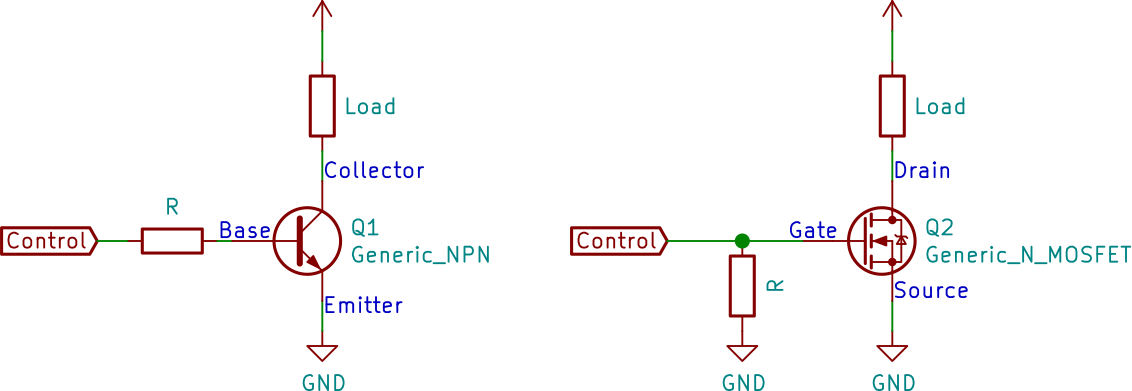
Low-Side with FET Pull-down
For an NPN BJT, the emitter connects to ground, and the collector attaches to the negative side of the load. As a switch, the BJT operates in saturation mode. Saturation means there is enough base current to turn on the transistor fully.
For an N-Channel MOSFET, the source connects to ground, and the drain connects to the negative side of the load. While you can use a JFET for this circuit, an enhancement mode MOSFET works better.
High-side transistor switch
The opposite of the low-side switch is the high-side switch. This transistor connects between +V and the load. Because of how transistors work, these can be a little more difficult to use in an Arduino or Raspberry Pi circuit.
Typically these use a PNP BJT or P-Channel MOSFET.
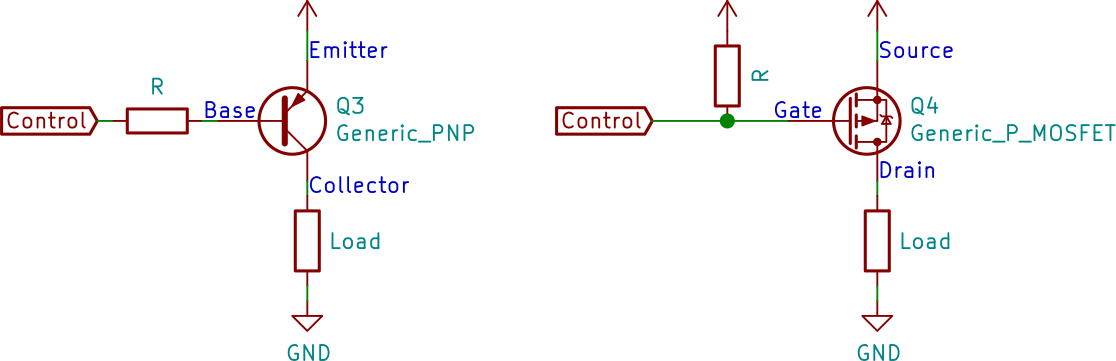
High-Side with FET Pull-Up
For a PNP BJT, the emitter connects to the voltage source, while the collector connects to the load’s positive side. Looking at the schematic drawing for an NPN and PNP, the PNP might look like it is upside down. Like the NPN, the PNP BJT must operate in the saturation region to turn on the transistor fully.
For a P-Channel MOSFET, the source connects to the voltage source, and the drain connects to the load’s positive side. Like with the low side, you probably want to use an enhancement mode MOSFET. Keep in mind that you may never find a depletion mode P-Channel. They only exist in textbooks and as data entry errors.
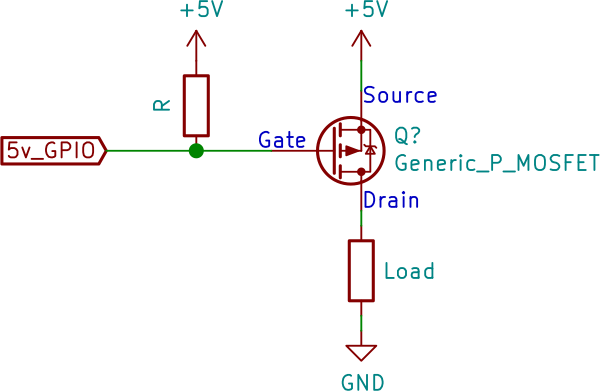
P-Channel MOSFET with same load voltage
The circuit above works fine when using a P-type transistor on a load voltage that is the same voltage level as the signal driving the transistor. Well, the logic is inverted but other than that, it is fine. For a detailed explanation, check out my post on P-Channel MOSFET Tutorial with only Positive Voltages.
You need a driver when the load voltage is HIGHER than the signal voltage. Next, let’s see how a driver gets used with low-side and high-side transistor switches.
Transistor driving another transistor
A driver transistor circuit is one that controls another transistor. This circuit is not the same as a BJT Darlington pair, which is a high-gain BJT. Instead, a transistor driver is used when the driving signal’s voltage (or current) is incompatible with the load transistor. Below are two cases where you might need to use a transistor driver. These are, by no means, the only ones. So if you know of a case, or suspect you need one, leave a comment with it.
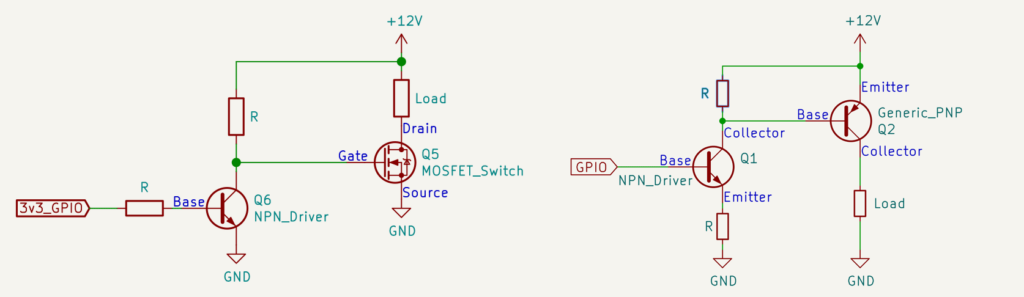
Transistor Driver Examples
High current MOSFETs have a substantial Vgs threshold. While 5 volts from an Arduino GPIO pin might be enough to turn on the transistor, it isn’t enough to drive it into saturation. Until the FET is saturated, its Rds-ON can be relatively high, limiting the maximum current it can handle.
Note: A common mistake is saying “For a switch, drive a MOSFET into saturation.” This is NOT the case. It turns out, saturation for a MOSFET is different from saturation for a BJT! (Their definitions are swapped!)
In a MOSFET operating as a switch, you want it to stay in the linear (or ohmic) region.
(I’ve updated this post, because I accidently said the wrong thing…)
Using an NPN driver with a PNP BJT or P-Channel MOSFET is very common when the load voltage is higher than the signal voltage. Without a driver, the transistor may never turn off. The driver effectively boosts the driving voltage high enough to unbias the Vbe or Vgs junction of the transistor. My tutorial on PWM a PC fan is an example of an Arduino driving a 12 volt fan with a PNP.
Why even bother with high-side transistors?
For both BJT and MOSFET transistors, their P-Type generally have more resistance (or lower current capability) than their N-type counterparts. For that reason, some might conclude you should always use an N-type in a low-side configuration.
However, step back and think about what the two different circuit types are doing. The low-side switch is switching ground while the high-side switch is connecting the voltage supply. Generally, you want to keep the ground connected in a circuit and switch the power. One reason is that even when the transistor is fully turned on, there is still a small voltage drop across it. That voltage drop means the ground is not 0 volts for that device. It does not matter which you switch for something simple like an LED. However, an active device like a Microcontroller needs its ground to be ground! So when you have a load that requires ground, you NEED to use a high-side switch.
As a quick rule of thumb, a low-side switch is a simple solution if you turn a device on and off. However, if you are delivering power to an entire circuit or a voltage-sensitive device, then you want to use a high-side switch.
By the way, there are off-the-shelf components called “load switches.” These ICs have a P-Channel MOSFET as the switching transistor with a built-in driver for that P-Channel. There is no external driver needed for this type of component.
Transistor Basics Links (for Reference)
- The Learning Circuit, How Transistors Work. Karen explains from the ground up how bipolar junction transistors (BJTs) operate. There are many transistor physics explanations on the web, but Karen’s is the clearest one I have encountered.
- The Learning Circuit, BJT Feedback. In this TLC episode, I joined Karen and addressed some misconceptions from the community (and I suspect others) on the video linked above.
- AddOhms, BJTs. The video I made about BJTs. I don’t get into how the electrons work, but instead, I show how to use one in a circuit.
- AddOhms, MOSFETs. Part two of my transistor videos. In this episode, I explain how to use MOSFETs.