Found this one while going through some old files. One of my favorite volunteering activities is introducing kids to engineering. After judging a FIRST competition, I learned about Central Texas Discover Engineering. They had a program that gave me a chance to spend an entire day talking to middle school kids about engineering.

I started the class with a simple question: “What do engineers do? Surprisingly, most of the kids answered pretty well. Then I went through these slides to give them an idea of other types of engineers. Lastly, we did a fun “engineering” activity.


Getting programming questions answered on the internet can be problematic. Programmers love to have opinions, stick to those ideas, and express them to you even when their opinion has nothing to do with your question(s).

Not only am I going to explain how to use flag variables in your code, I am going to encourage their use—which most programmers avoid.

However, this advice comes with two caveats.

  1. This information only applies to limited resource environments like an Arduino, LaunchPad or PIC.
  2. Use flag variables very carefully when you do use them.

The following flag variable usage examples are Arduino-centric but apply to any microcontroller platform, including the Energia project for TI Launchpads.

On every page of my blog, you might notice a chat window. If I’m not busy, we can chat in real-time. If not, the messages come to me by email. Here’s one I got from Matt the other day:

Let’s talk a bit about how (and why) you would use a P-Channel MOSFET. Matt, and he’s not the only one, is probably asking this question based on the “myth” that P-Channel MOSFETs require “negative voltage” supplies.

Keep reading for how-to use only positive voltage in this p-channel MOSFET tutorial.

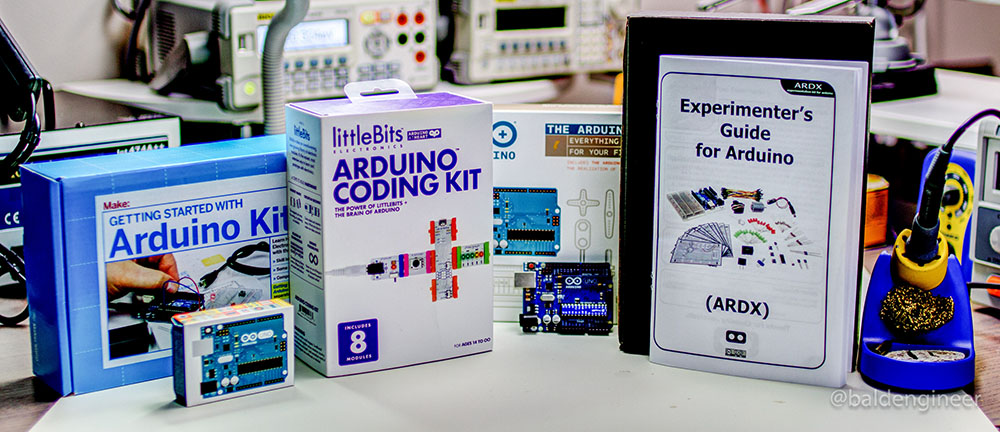
The other day my friend called me up. He told me how much he missed building circuits and wanted to start again with the Arduino.

So he asked me “which Arduino starter kit is the best to buy?” At which point, I drew a long breath. Easy question, not always an easy answer.

Picking out an electronics kit depends on a number of factors. You should consider:

  1. Your budget
  2. What you already have
  3. What you want to do

#1 and #2 are probably pretty easy to figure out. For many beginners, it’s “not much” and “nothing.” When you don’t know #3, what you want to do, then it gets trickier. Coming back to my friend, what did I do? Well, I went out and bought each one of the kits in this post. I put myself in his shoes and maybe these are your shoes as well.

Assuming you have about $100 to spend, have no components on-hand now and just want to “get started” consider one of these 4 Arduino starter kits.

Learned about it in this video from the YouTube Channel My Life in Gaming. Some of their videos are a bit more technical than the general “retro review” style, which is why I started watching.

In their RGB 300 Video Series, they covered a homebrew project called “240p Test Suite.”

This project includes a number of test graphics and patterns to help in adjusting the settings of a modern TV. Even more impressive are the systems it covers:

  • Nintendo Wii
  • NSuper Famicom / SNES
  • Nintendo GameCube
  • Sega Mega Drive (Genesis)
  • Mega CD (Sega CD)
  • Sega Dreamcast
  • PC Engine (TurboGrafx-16) / PCE Duo

Check out this wiki page which lists all the tests and download it for your retro gaming platform.

CD-based systems are pretty easy to run since most of the era didn’t have copy protection. For the cartridge systems, you’ll need something like an EverDrive / SD Card reader for ROMs to make it work.

I’ve got mine on order…