Author

James Lewis

Browsing

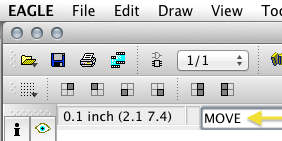
A very little known feature of EAGLE is the ability to type commands instead of clicking an icon on the toolbar.  This can come in handy when trying to perform multiple actions like selecting a group and moving it to a different part of the schematic.  For me, since I use OSX trying to use function keys in EAGLE can be more cumbersome than typing a few letters.

The quick answer to “How do you reset millis()” is:  You Don’t!  And here’s why:  if you did, it would potentially break most libraries and functions that rely on it.  Generally the reason people want to reset it, is that they are concerned about rollover.  Instead of focusing on resetting millis(), here is how to use it correctly.

Need to brush up on how millis() works?  I’ve got a tutorial on how to effectively multi-task with millis() and another line-by-line tutorial on blink Without delay

Avoiding rollover and checking how much time as passed is done in a single line:

if ((unsigned long)(millis() - previousMillis) >= interval)

That single line of code is all that is really needed, to avoid rollover!  Pretty simple, huh?  So let’s go into more detail about how this works and what each of those variables does.

Short build-lapse video of building up the front panel “matrix” used in BinBoo.  This isn’t a true LED matrix.  Instead it combining all of the LEDs into a common Anode, since the Cathodes are all controlled by individual outputs of the TLC5940.

I decided to wire up 16 LEDs, even though a binary clock only needs 11 or 12.  This gives some flexibility to other uses for the box, like a random sci-fi computer pattern.

Project Page:  BinBoo = Binary clock + Bamboo

How many times have you been part way through ordering parts for a project when you realize the distributor you are using, doesn’t have any of the part you need in stock? Or maybe you want to design a kit and compare prices of parts. This is where findchips.com comes into play. This awesome free resource will scan inventory across a variety of distributors for a given part number.  Not only will you see inventory levels but it is also a fast way to compare prices.