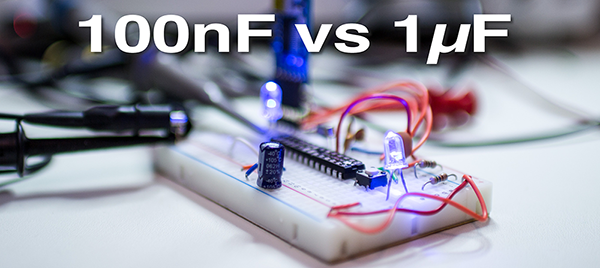
To save time, breadboard pins or just lack of knowledge people try to skip adding even one decoupling capacitor to a circuit. Either on IRC or in Forums you can almost always see it coming: “randomly, my circuit stops working” And then, “what do you mean a decoupling capacitor?” question.

While working on breadboard Arduino, I came across some unexpected measurements. Initially, the only capacitors on the breadboard were the two 22pF from crystal to ground and the capacitor connected to RESET for Auto-RESET.

Keep reading to find out what happen when I added a 100nF and a 1µF cap. A bunch of scope traces and surprising results follow.

Breadboard Arduino with no Decoupling Cap

The Arduino Library provides functions like shiftOut() and digitalWrite().  These functions are simple and effective, but they are slow. Of course, they’re doing a lot more than just toggling bits. Faster isn’t always necessary and can sometimes lead to more difficult debugging.  And as Donald Knuth said,

…premature optimization is the root of all evil.

So what happens, when you do need to optimize? For example, if shiftOut() is too slow for your project, what do you do?  In Ralph’s post, Fastest AVR software SPI in the West, he breaks down different SPI code implementations into their assembly code.

To make the best optimization, you need to change compiler flags. So this is, in my opinion, an interesting case study in what kind of performance benefit you can get when you do some serious optimization.

Of course, you really shouldn’t, unless you need it…

Check out his post: Fastest AVR software SPI in the West

Knuth quote from his paper “StructuredProgrammingWithGoToStatements.”

element14 is running a Design Challenge called Enchanted Objects. The idea is to add magic, or modern technology, into older objects, enchanting them. How could you turn an ordinary household object into something extraordinary?

You can see the content intro video here.

With my recent interest in retro-electronics, an entry by Jan Cumps caught my eye. He’s repaired a vintage record player (turntable) using an Arduino and Pulse Width Modulation (PWM) control. For more information on his work, the project page is here. Jan’s YouTube channel is at pitface123.

The Fitbit API allows you to get data from a Fitbit and use it in your own applications.

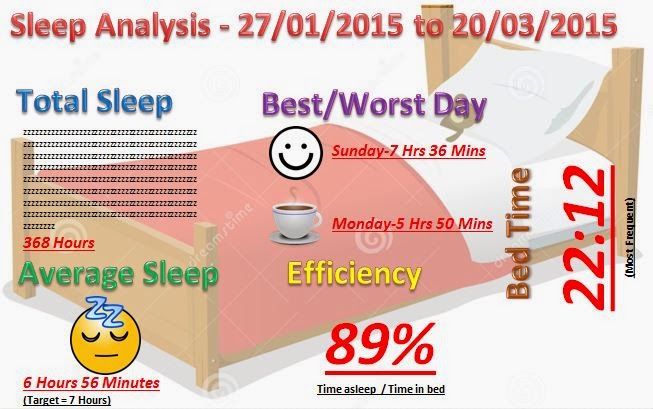
Paul wrote a Python script which runs on his Raspberry Pi which extracts the data. Then we processes the data using Excel. Once doing so, he created the above sleep infographic–his first effort.

The interesting aspect here, to me, is the idea of these wearable devices and their data. It is great we have large-scale data creation, but it is even better have access to the data for processing.

Great example of charting out critical health data using easily accessible tools.  Check out Paul’s full writeup with description and code.