

Use de-caffeinated Silicon, of course!


Use de-caffeinated Silicon, of course!
When describing a person, do you ever use the phrase “their strength is their weakness?” That’s how I feel about Internet forums. The strength of forums is the collective knowledge of like-minded people, some with more experience than others. Sadly, that is also the weakness of Internet forums… Whether it is a topic-specific site like the EEVBlog Forum or an almost anything site like Reddit the strength/weakness holds true.
Lucky for us, most engineering-focus forums are a positive place to ask question and get electronics help.
If you ask better questions, you can get better answers. So, here are 4 proven tips to help ask better questions, when looking for electronics help.
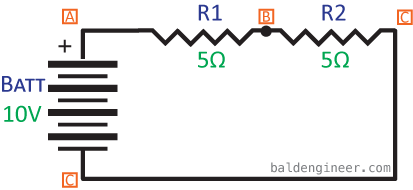
The funny thing about schematics is that they are much easier to draw than they are to read. There are many common circuits. When an experienced engineer looks at them, it’s like a second language. When someone less experienced looks at them, it looks like random lines and symbols thrown together at the last-minute. (Or maybe that’s just the schematics *I* draw.)
Other than reading Schematic Symbols themselves, one of the basic skill necessary to read a schematic is recognizing series and parallel circuits.
In short if the same current flows through all the parts, they are in series. While if current has different paths, they are in parallel. Keep reading to dive into this tutorial on how ohm’s law applies to series and parallel circuits.
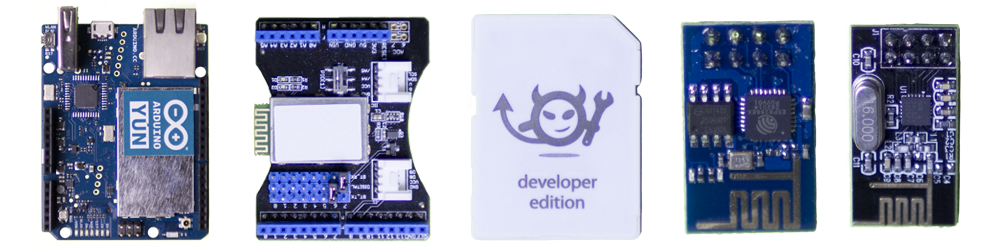
Getting your project connected to the internet is relatively easy these days. Here are five off the shelf modules that will easily add wireless to your project.
Back when I was in school, I remember spending an entire semester making a RF amplifier board. In fact, I had to use a pencil eraser to remove oxidation on the copper traces to remove an unwanted oscillation, caused by the impedance mismatch of the oxidation on the copper traces. Talk about tough.
These days, adding WiFi or Bluetooth is as simple as adding one of the wireless modules available. Or if you are using an Arduino, skip the modules and just add a shield.
Keep reading for 5 different wireless modules to consider for your project.
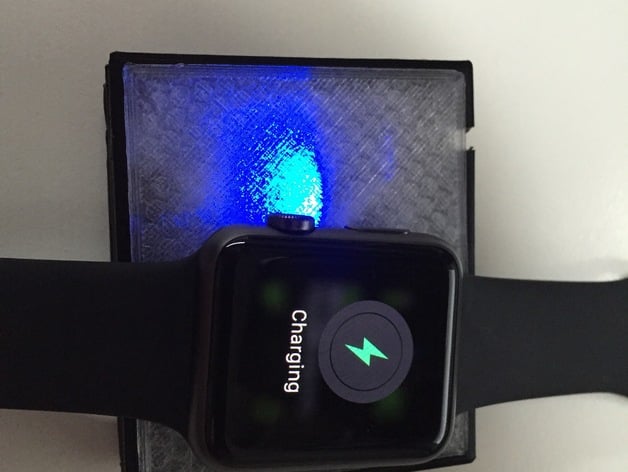
Using an Adafruit Charger Board, a cut-up magnetic Apple Watch Charger cable and some 3d printing, guypl has created a DIY battery-powered charger for the Apple Watch.
The cool thing about the design is that the 2000mAh battery he used, can be recharged with a standard micro USB cable. As someone who travels often, this setup is ideal for me. One less cable to carry and a self-contained charger for the Apple Watch.
Check out the full project on Thingiverse.


