Category

Around The Web

Category

Using a learning algorithm known as NEAT, this Super Mario World play through is an example of a machine learning how to beat the level on its own. Using an evolutionary process, a neural network was built–or learned–to complete the level. The name of the program used to control Mario is called… Mar-I/O.

  • N: Neuro
  • E: Evolution of
  • A: Augmenting
  • T: Topologies

The initial play through is fascinating as well as the breakdown of what is going on. Well worth the 5 minutes.

[Update… Ryan in the comments provided this MarI/O version modified to factor in score.]

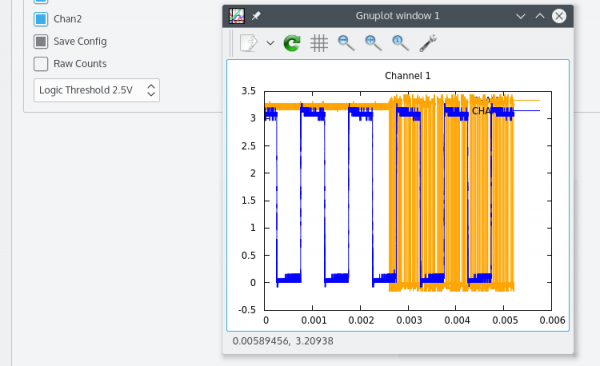
The Rigol DS1052E digital oscilloscopes are very popular for both hobbyist and professional engineers. These are very affordable scopes that pack a lot of value. Most of the software tools offered from Rigol only run on Windows. Al Williams has fixed that with the the qrigol project on GitHub.

From the readme file:

  • Uses USB communications with Scope
  • Allows keyboard to be unlocked so you can use both the panel and the software
  • Allows easy reading of all measurements as well as logging of all measurements
  • Control of common scope functions
  • Saves waveforms in CSV format
  • Integrates with external plot software like gnuplot to qtiplot
  • Diagnostic mode to send raw commands to scope

There’s a couple of limitations, but I want to draw attention to one. If your region uses a comma (“,”) as a decimal point, you might run into issues. For more information, you might want to check out the qrigol thread on the EEVBlog.

Apple Watch Charger on Thingiverse

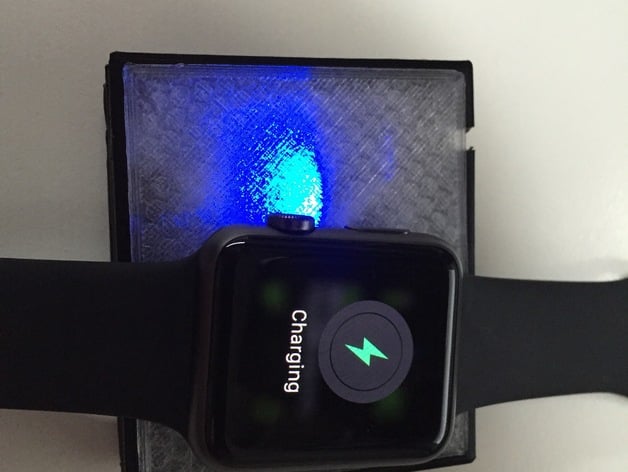
Using an Adafruit Charger Board,  a cut-up magnetic Apple Watch Charger cable and some 3d printing, guypl has created a DIY battery-powered charger for the Apple Watch.

The cool thing about the design is that the 2000mAh battery he used, can be recharged with a standard micro USB cable. As someone who travels often, this setup is ideal for me. One less cable to carry and a self-contained charger for the Apple Watch.

Check out the full project on Thingiverse.


Learning to a breadboard is critical when adding electronics to a project. A skill often overlooked is how to use breadboard jumper wires correctly. For example, when I breadboard a circuit I only use Red, Green, or Blue for positive voltages and Black for ground. Other colors, it depends on the functions of the wire. The idea is to keep it clear when I look at the board, what each wire is doing.

This video from Make is a great overview of how to develop a skill, or habit, around using breadboard jumper wires in your circuit.

For more information, there is a short writeup on their web site as well.

Today “regular” people will start receiving their pre-ordered Apple Watch. Whether they spent $350 or over $10,000 dollars, they’ll now have a device that connects to their iPhone and tells time. Like their iPhone does. But with Bluetooth!

What if you don’t want an Apple watch, but want to celebrate a real computing achievement? Check out this video on an Apple ][ watch. Oh and it is real.

That’s right, this isn’t just some clever movie-magic hoax. Following this Instructable, you can build your own Apple ][ Watch.