The other night I happened to see a tweet come across my twitter stream from Joe Walnes (@joewalnes) about a resistor color code tool he created. You can find it at the clever domain resisto.rs. Type in a value and see what the proper color code should be. This is great for when you need to go searching through a pile of resistors and want to make sure you have the code right.
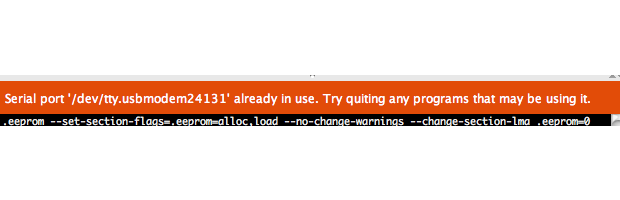
Here’s a couple of quick tips to get around the Arduino IDE error message “Serial Port in Use.” These mostly apply to OSX, but since it is UNIX based, they may make sense for Linux as well.
List Open Files
Applies to: OSX, Linux.
The check to see if another process (like a previous run of avrdude) is holding the serial port open is easy on both Linux and OSX. Just open a terminal and run the command: lsof. The command will report back all files that are currently open by the operating system. UNIX-based operating systems do everything through files, so this command is useful to see what is keeping a serial device open. Since lsof gives a list of everything that’s open, and there are a lot of “files”, use grep to only list what is relevant.
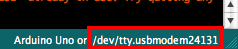
Take a look at your Arduino IDE to see the device name assigned to your Arduino’s virtual serial port. This name will change based on what USB to Serial chip and operating system you are using. While you can use the full name like “/dev/tty.usbmodem023432” to search for the open device, I suggest just using a substring like “usbmodem“.
If nothing is returned, then that says no other processes are holding the file (or device handler) open. If one (or more) processes are returned, you can do some further investigation.
Here we can see that the process “screen” currently has the serial port open. (Which I would expect, because I use screen in place of the Arduino Serial Monitor.) Which, by the way, looks like this on OS X:
JavaAppli 6570 james 48u CHR 33,16 0t562 783 /dev/tty.usbmodem24131
If you know the process shouldn’t have a hold on the device anymore, you can always make use of the kill command.
/var/lock
Applies to: OSX. (Maybe Linux)
If your installation of OSX is missing a writable lock file, you will get a Serial Port in Use error from avrdude, even though it isn’t. So if you run the lsof command from above and don’t see anything holding the port hostage, then do this quick check to see if the lock file is writable (or exists):
You’ll be asked for your system password the first time (and then it is remembered for the second) because of the sudo command. You need temporary admin (root) privileges. The mkdir comamnd creates a directory or folder while the chmod command will set permissions. Feel free to click on the each of those links to verify what those commands do.
To be honest, I’m not entirely sure why this works. Personally, I do not have a lock folder and avrdude connects to my Arduino boards just fine. However, this simple fix has helped several people in the forums. Since it is pretty innacious, it might be worth an attempt!
What if it is Still Broken?
These two fixes won’t always solve the Serial port issue. If you still get the “Serial Port in Use” error even though you verified nothing else is using it, then you might want to post in the Arduino Forums for a bit more help.
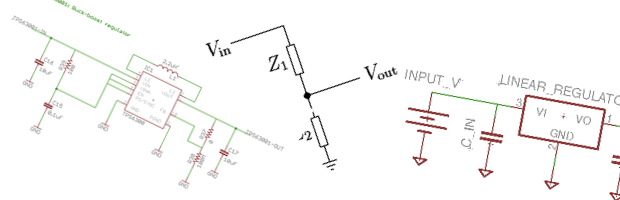
Fundamentally there are two types of voltage regulators: linear and switching. The names come from how they operate and how they achieve voltage regulation. Linear regulators tend to be a little cheaper to implement, but they aren’t as efficient as their more complex switching variants.
There are also some “cheap and dirty” methods that some designs use. Below is a brief description and example of each.
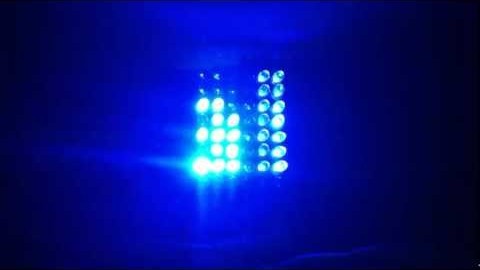
After getting a couple of flashing lights working on a microprocessor, the next fun project is generally building some kind of Matrix. At first I built a 5×5 LED matrix which was relatively simple to solder together. When trying to make one much larger, the task because significantly more complex. That’s when I decided to build a LED Matrix Shield for the Arduino which did not use Charliplexing, like the LoL shield. I wanted something that was simpler to understand and (ultimately) code for. Unfortunately, 5mm LEDs means 8 columns x 6 rows, instead of the traditional 8×8.
Digital ICs like microcontrollers, memory, and shift registers need a stable voltage source to make sure they work as expected. Most circuits are designed with a voltage regulator to accomplish this stability. In theory voltage regulators will vary their output to stay at a set voltage, regardless of how much current the load is drawing. As a load draws a little bit more current, the supply voltage will begin to sag. Conversely when the load is reduced the voltage may rise a little bit. Regulators work to eliminate, well minimize, this change.
Like other websites, this one uses cookies to remember things. Mostly, I use Google Analytics to know how many people come here. ¯\_(ツ)_/¯
By clicking “Accept”, you consent to the use of ALL the cookies.
This website uses cookies to improve your experience while you navigate through the website. Out of these, the cookies that are categorized as necessary are stored on your browser as they are essential for the working of basic functionalities of the website. We also use third-party cookies that help us analyze and understand how you use this website. These cookies will be stored in your browser only with your consent. You also have the option to opt-out of these cookies. But opting out of some of these cookies may affect your browsing experience.
Necessary cookies are absolutely essential for the website to function properly. These cookies ensure basic functionalities and security features of the website, anonymously.
Cookie
Duration
Description
cookielawinfo-checkbox-advertisement
1 year
Set by the GDPR Cookie Consent plugin, this cookie is used to record the user consent for the cookies in the "Advertisement" category .
cookielawinfo-checkbox-analytics
11 months
This cookie is set by GDPR Cookie Consent plugin. The cookie is used to store the user consent for the cookies in the category "Analytics".
cookielawinfo-checkbox-functional
11 months
The cookie is set by GDPR cookie consent to record the user consent for the cookies in the category "Functional".
cookielawinfo-checkbox-necessary
11 months
This cookie is set by GDPR Cookie Consent plugin. The cookies is used to store the user consent for the cookies in the category "Necessary".
cookielawinfo-checkbox-others
11 months
This cookie is set by GDPR Cookie Consent plugin. The cookie is used to store the user consent for the cookies in the category "Other.
cookielawinfo-checkbox-performance
11 months
This cookie is set by GDPR Cookie Consent plugin. The cookie is used to store the user consent for the cookies in the category "Performance".
CookieLawInfoConsent
1 year
Records the default button state of the corresponding category & the status of CCPA. It works only in coordination with the primary cookie.
viewed_cookie_policy
11 months
The cookie is set by the GDPR Cookie Consent plugin and is used to store whether or not user has consented to the use of cookies. It does not store any personal data.
Functional cookies help to perform certain functionalities like sharing the content of the website on social media platforms, collect feedbacks, and other third-party features.
Cookie
Duration
Description
language
session
This cookie is used to store the language preference of the user.
Performance cookies are used to understand and analyze the key performance indexes of the website which helps in delivering a better user experience for the visitors.
Analytical cookies are used to understand how visitors interact with the website. These cookies help provide information on metrics the number of visitors, bounce rate, traffic source, etc.
Cookie
Duration
Description
_ga
2 years
The _ga cookie, installed by Google Analytics, calculates visitor, session and campaign data and also keeps track of site usage for the site's analytics report. The cookie stores information anonymously and assigns a randomly generated number to recognize unique visitors.
_ga_LHR6J24XSY
2 years
This cookie is installed by Google Analytics.
_gat_gtag_UA_42726312_1
1 minute
Set by Google to distinguish users.
_gid
1 day
Installed by Google Analytics, _gid cookie stores information on how visitors use a website, while also creating an analytics report of the website's performance. Some of the data that are collected include the number of visitors, their source, and the pages they visit anonymously.
browser_id
5 years
This cookie is used for identifying the visitor browser on re-visit to the website.
CONSENT
2 years
YouTube sets this cookie via embedded youtube-videos and registers anonymous statistical data.
Advertisement cookies are used to provide visitors with relevant ads and marketing campaigns. These cookies track visitors across websites and collect information to provide customized ads.
Cookie
Duration
Description
VISITOR_INFO1_LIVE
5 months 27 days
A cookie set by YouTube to measure bandwidth that determines whether the user gets the new or old player interface.
YSC
session
YSC cookie is set by Youtube and is used to track the views of embedded videos on Youtube pages.
yt-remote-connected-devices
never
YouTube sets this cookie to store the video preferences of the user using embedded YouTube video.
yt-remote-device-id
never
YouTube sets this cookie to store the video preferences of the user using embedded YouTube video.
yt.innertube::nextId
never
This cookie, set by YouTube, registers a unique ID to store data on what videos from YouTube the user has seen.
yt.innertube::requests
never
This cookie, set by YouTube, registers a unique ID to store data on what videos from YouTube the user has seen.