The TENMA 72-2660 portable power supply offers bench supply capability in a backpack-friendly package. The single output is capable of 45 watts with up to 30 volts and 3.75 amps out. The built-in USB ports offer an easy way to power 5 Volts Arduino or Raspberry Pi projects while limiting their current. See how this portable supply performs, the things the Bald Engineer likes about it, and the points to consider before buying
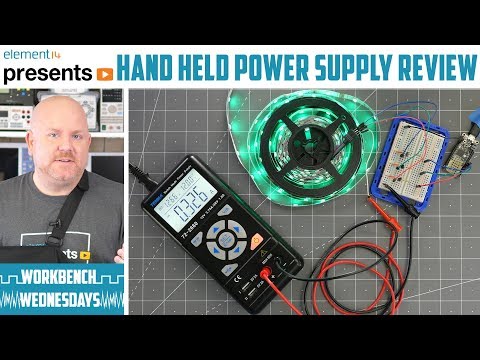
This $100 power supply, model number 72-2660, is cool. It’s about the size of a digital multimeter but can output 45 Watts. Both voltage and current are adjustable. It can output up to 30 volts and 3.75 amps, but not at the same time. It does have a flaw in its design though. Fortunately, I was able to find and apply a fix for it. Overall, if you want a portable adjustable supply, this one is worth checking out.

If you are new to bench or lab power supplies, check out this bench power supply basics video.

To answer a common question: yes, I did injure my shoulder. Right before shooting the A-Roll, the parts with me on camera, I tripped. As I went to catch myself falling, I tore two of the muscles in my shoulder. It took about 6 weeks to completely heal. Yuck!

Show notes on element14

An overlooked danger of electronics soldering is the fumes. While the smell and smoke may not be pleasant, the chemicals in the fumes can be harmful. Is solder made with lead(Pb) your only concern? Learn about where lead-free solder came from, what different flux types mean, and two ways to keep your air (and your lungs clean.)

In the video, I show a cheap “smoke eater” and a professional fume extractor. There is a cost difference of $50 and $700 between the two. However, either is better than having nothing.

Ask Questions on element14

The most popular AddOhms video is my short tutorial on MOSFET basics. In the years since I posted the video, people have sent me many questions. While answering those questions I’ve learned quite a bit as well. For example, in that video, I say that Vgs is the threshold to turn on the MOSFET. Well, it turns out, that is not entirely true. It is the threshold to turn it off! Oops. A minor point with a subtle difference, but a common MOSFET misconception.

In this post, I dispel that and other common myths and misconceptions around using MOSFETs. As with all engineering tips and tricks, this post is not a definitive guide to FETs. Instead, it is meant to be a guide to help you ask the right questions to design in the correct part.

1. Misconception: You don’t need resistors on the gate

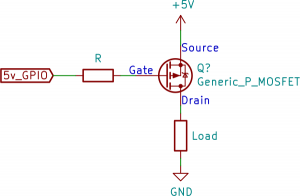
Back when I made the AddOhms episode, I added a resistor to the MOSFET’s gate pin. Of course any time a resistor is shown in a schematic, people get worried about what complicated formula is needed to determine its value. For slow switching applications, like below 10 kHz, the resistor value doesn’t matter. Something in the 100 to 1000 ohm range is fine.

P-Channel with series gate resistor

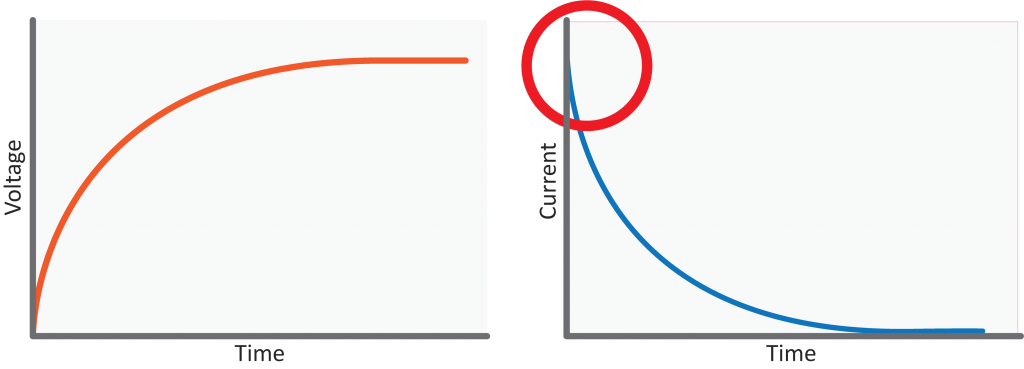
So if the value does not matter, why have one? The gate of a MOSFET is a small capacitor. And what happens when applying a voltage to a capacitor? It starts charging.

Resistor-Capacitor Charging Curve: Voltage and Current

The initial current is very high. It slows down as the capacitor charges. That initial current rush, also known as in-rush current, can be a problem. Even though it is a short time, there is a significant current surge that can damage an I/O pin. Depending on the size of the MOSFET’s gate capacitance, it may not be necessary to include that resistor. I wish I could say to “just” add it any time you use a MOSFET. If there is a high switching frequency, say 100 kHz or higher, then you have to worry about the RC charging curve created by the resistor and the gate capacitance.

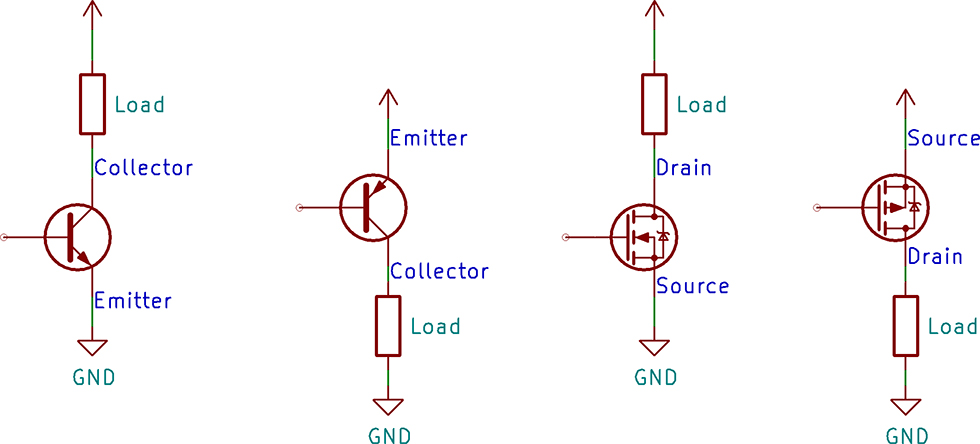
A common task for a transistor is switching a device on and off. There are two configurations for a transistor switch: low side and high side. The location of the transistor determines the type of circuit and its name. Either transistor configuration can use a BJT or MOSFET.

In this post, I draw the configuration for both transistor types, discuss which requires a driver, and explain why you would use either. If you are new to transistors, check out the resource links at the bottom. I have a few videos I made and some from element14’s The Learning Circuit, which do a great job introducing transistors.