Category

Arduino

Category

pinMode analog input tip

All Arduino boards contain analog and digital pins. The Arduino functions have different calls depending on the pin type. For example, when calling analogRead(), an analog input pin is automatically changed from a digital input (or output) into an analog input. For this reason, it isn’t necessary to call the pinMode function on the pin. However, when I write Arduino Sketches, I still put a pinMode(A0, INPUT) in setup anyway.

Keep reading to see why I use pinMode on Analog Inputs.

The Arduino Library provides functions like shiftOut() and digitalWrite().  These functions are simple and effective, but they are slow. Of course, they’re doing a lot more than just toggling bits. Faster isn’t always necessary and can sometimes lead to more difficult debugging.  And as Donald Knuth said,

…premature optimization is the root of all evil.

So what happens, when you do need to optimize? For example, if shiftOut() is too slow for your project, what do you do?  In Ralph’s post, Fastest AVR software SPI in the West, he breaks down different SPI code implementations into their assembly code.

To make the best optimization, you need to change compiler flags. So this is, in my opinion, an interesting case study in what kind of performance benefit you can get when you do some serious optimization.

Of course, you really shouldn’t, unless you need it…

Check out his post: Fastest AVR software SPI in the West

Knuth quote from his paper “StructuredProgrammingWithGoToStatements.”

What happens when you have a random chip or sensor you want to interface with an Arduino, but don’t know how? You search for a pre-existing library of course. And where are many libraries hosted and available from?  A place where eager developers hack together code, post updates, and collaborate with others: Github!

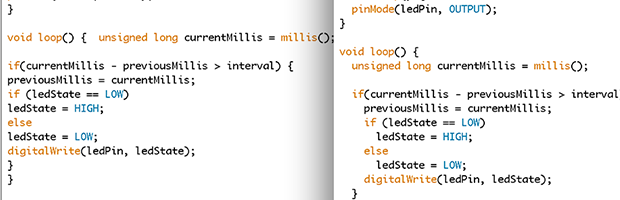
Warning, the title of this post is a little bit misleading. It isn’t just one-click to get cleanly formatted code, it’s actually two.

There are two things seasoned programmers will tell new programmers, that they don’t understand (at first):

  1. Always comment your code
  2. Properly indent code

The problem?  As a new programmer, you might not know how to do #2 until you get some experience.